

An Instagram shadowban is when Instagram limits your content’s reach without telling you. Your posts still go live, your account still works, but your content stops appearing in hashtag results, on the Explore page, or in Reels recommendations for people who don’t follow you.
Table of Contents
Instagram has never used the word officially. What it has confirmed is that accounts can be flagged as ineligible for recommendation, and that certain content gets its distribution reduced without any notification. Creators started calling that combination being shadow banned on Instagram. The name stuck.
This guide covers how to run an Instagram shadowban test, what causes a restriction, and how to fix it – starting with Instagram’s own Account Status tool.
What Is an Instagram Shadowban and Is It Real?
The confusion around this term starts with the fact that Instagram has officially confirmed the effect without ever using the word. So does Instagram shadowban accounts? The experience is real; the label is informal.
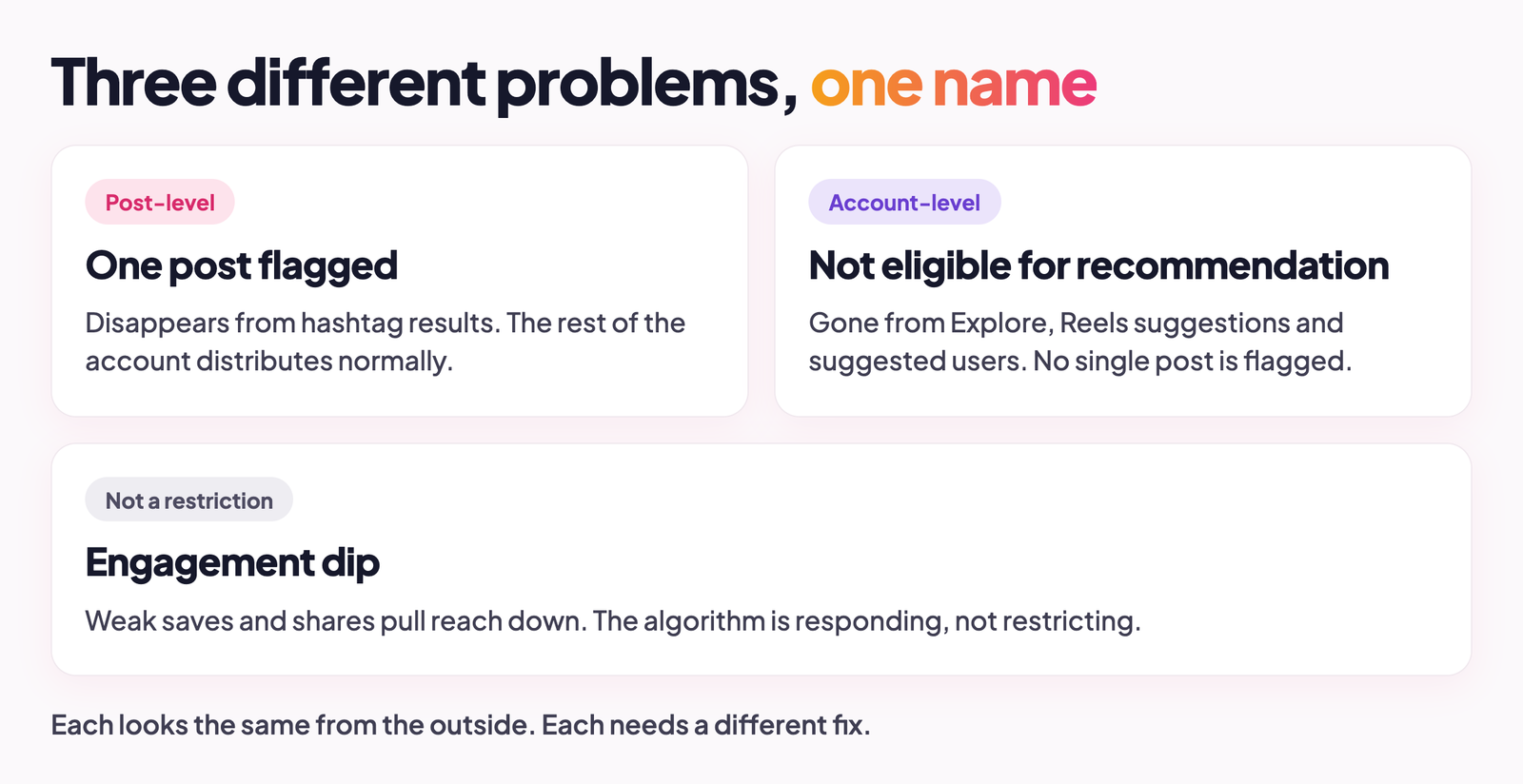
Part of what makes this hard to nail down is that ‘shadowban’ gets applied to several things at once. A single post might get flagged for a guideline issue and stop appearing in hashtag results, while the rest of the account distributes normally. Or the whole account might stop appearing in suggested users and Explore feeds without any individual post being flagged. Or reach drops because engagement signals have been weak and the algorithm is responding to that, which isn’t a restriction at all. Each situation looks similar from the outside and has a completely different fix. Treating them as the same thing is where most of the confusion comes from.
Am I Shadowbanned on Instagram? How to Run a Shadowban Test
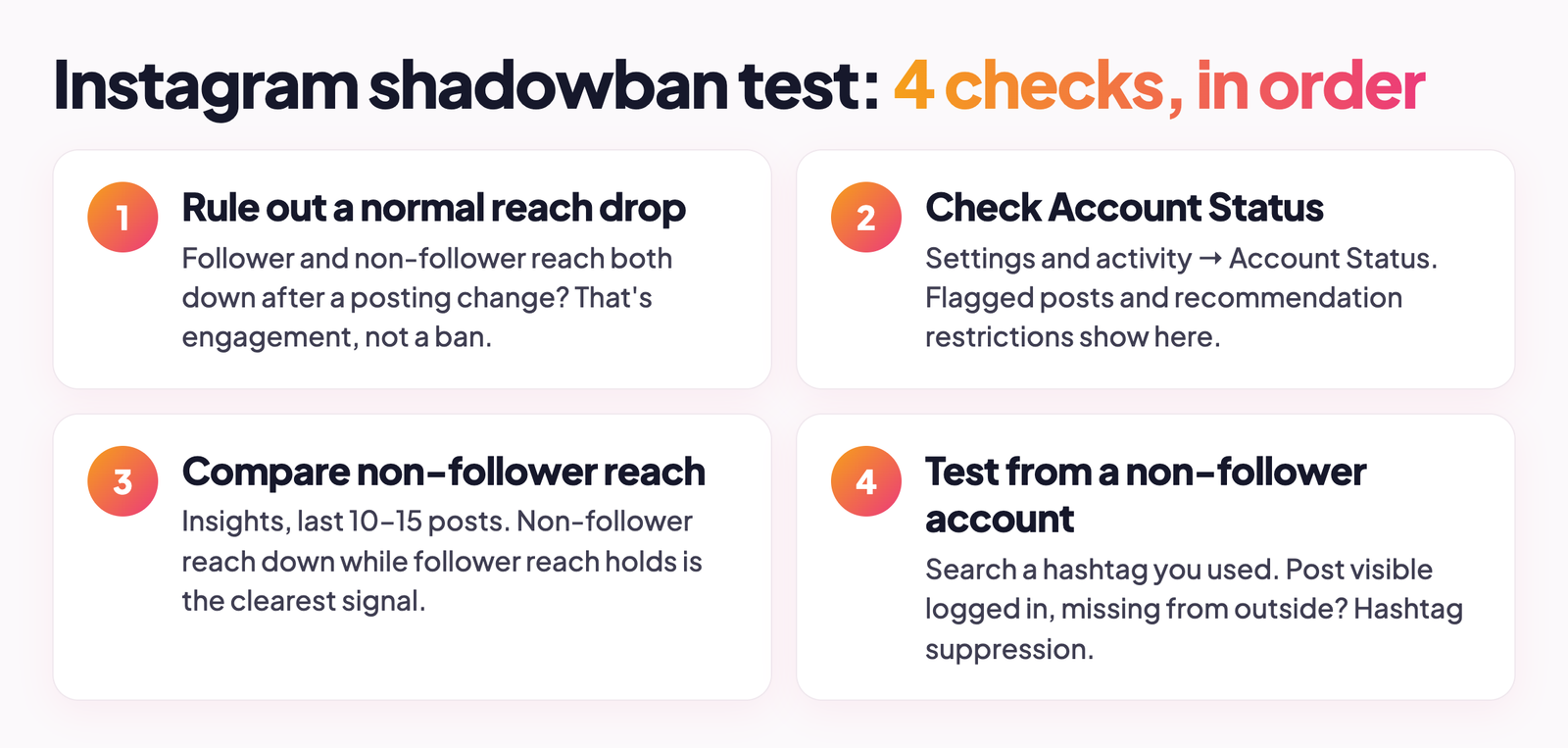
There’s no single check that gives a clean yes or no on whether you’re shadowbanned, because the restriction takes different forms. What you can do is work through several checks in sequence, each one looking at a different layer of the problem. Here’s how to know if you’re shadowbanned on Instagram – start at the top.
Rule Out a Normal Reach Drop First
A lot of accounts assume restriction when the more boring explanation is an algorithm dip. Before testing anything else, look at what changed in your posting pattern over the last three or four weeks. Did you post more or less than usual? Switch from Reels to static images? Put out a few posts in a row that got low saves and shares? Instagram’s distribution system responds to those signals, and a cold streak tends to compound: weak engagement on one post pulls down how far the algorithm pushes the next one.
If your follower and non-follower reach dropped at the same time, the more likely explanation is engagement-related rather than any kind of ban. The Insights check below shows how to tell the two apart.
Check Account Status for Recommendation Eligibility
Settings and activity, Account Status (or just search “account status” in Settings). This is where Instagram tells you directly whether your content is being limited and what triggered it. If a post has been flagged for a guideline category, it shows up here. If there’s an account-level recommendation restriction, it shows up here. It also tells you whether you can appeal, and it’s considerably more reliable for this purpose than any third-party tool. The official Account Status page is where Instagram’s own documentation points.
One thing to keep in mind: Account Status shows what’s been explicitly flagged. A clean result doesn’t rule out every form of algorithmic suppression, particularly the kind tied to engagement patterns rather than guideline violations. If yours comes back clear but the reach data still looks wrong, your Instagram may still be shadowbanned – keep going.
Compare Non-Follower Reach in Instagram Insights
On each post, Insights separates reach into two groups: accounts that follow you, and accounts that don’t. Pull that split across your last ten to fifteen posts and look at what the non-follower number has been doing. A sustained drop in non-follower reach while follower reach holds roughly steady is the clearest data signal that your content is being suppressed outside your existing audience. That’s what the restriction looks like in the numbers.
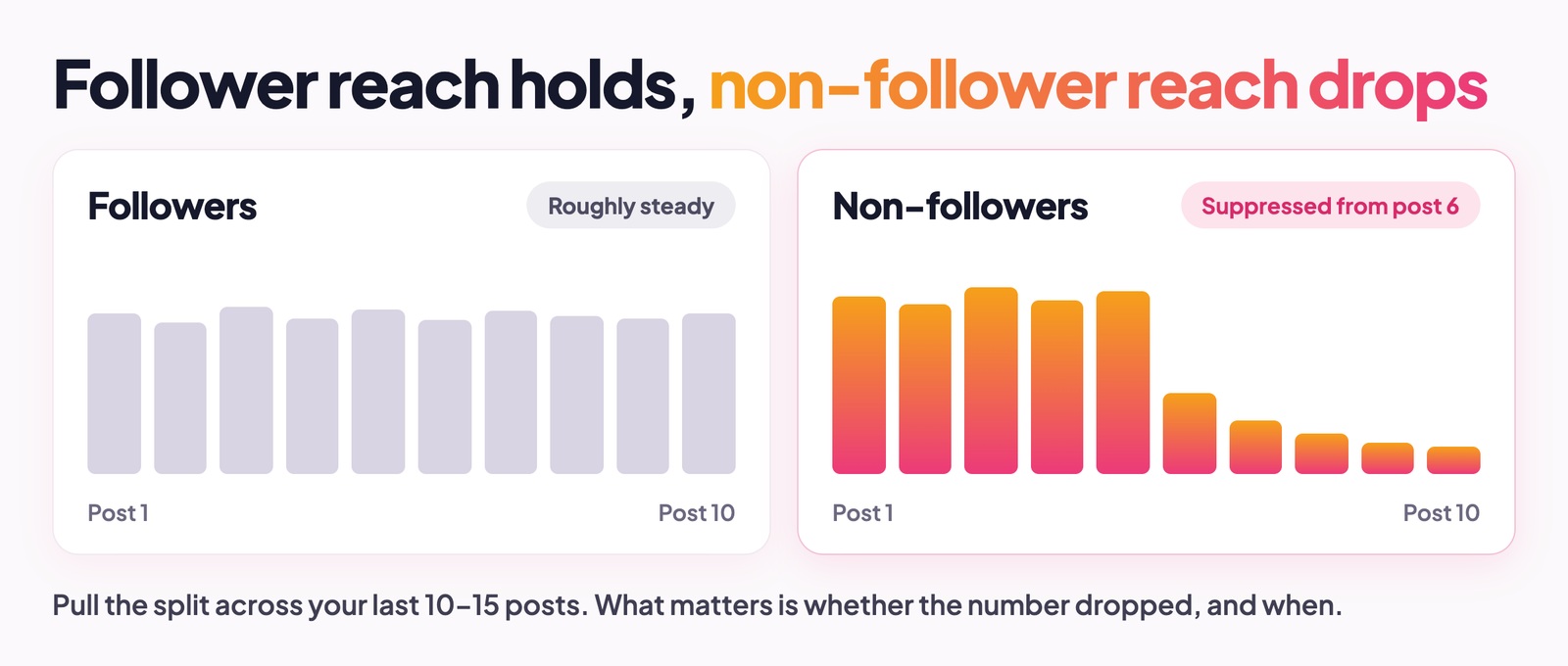
A number that’s been consistently low since you started the account is a different problem. That’s a distribution issue unrelated to any ban. What matters for this check is whether the number dropped, and when.
Test Your Profile and Hashtags From a Non-Follower Account
Log out, or pull up a second account that doesn’t follow you, and search for a hashtag you used on a recent post. Check whether your post appears. If it shows up when you’re logged in but doesn’t appear in the hashtag results from the outside account, your content is being suppressed for non-followers in hashtag search. Run the same check on your username. Search your account from the outside view and note how easily it comes up. Hashtag suppression and search suppression are technically separate issues, but finding either one is a useful signal.
Do Instagram Shadowban Checker Tools Work?
Third-party Instagram shadowban checker tools are narrower than they look. Most check whether a recent post appears under a hashtag, which is only one form the restriction can take. Account-level recommendation blocks don’t register on these tools at all. Beyond that, a lot of them require you to log in, which means handing a random app access to your account, and third-party app access is one of the things that can cause a restriction in the first place. They’re not entirely useless, but the Insights check and Account Status together give a more complete picture without that trade-off.
Why Am I Shadowbanned on Instagram? The Most Common Causes
You can get shadowbanned on Instagram without ever meaning to break a rule. Instagram’s systems are looking for patterns that suggest automation or manipulation. Most accounts that end up restricted have something identifiable behind it, even if it wasn’t obvious when it happened:
- Recent guideline violations. A single post flagged for misinformation, regulated goods, or sensitive content can carry account-level effects even if only that post is restricted. Account Status names the category when this is what happened.
- Third-party automation. Bots, auto-likers, follow/unfollow services, any app posting or engaging on your behalf. Instagram’s detection systems are specifically built to catch non-human activity patterns. The fact that you authorised the tool doesn’t make the behaviour look human to the platform.
- High-volume manual actions. Rapid follow/unfollow cycles, liking hundreds of posts in a short window, mass DMs. Instagram treats activity spikes as spam signals regardless of whether automation is involved. The volume and the pace both matter. Knowing things like Instagram’s follow limit helps.
- Restricted hashtags. Some hashtags have been flagged based on the content historically posted under them. Using one of these, even on an entirely unrelated post, can suppress that post’s distribution in hashtag results.
- Reports from other users. A spike in reports against your account or specific posts triggers a review process. A restriction can follow even when the reports don’t result in content removal.
- Apps you stopped using but never disconnected. Tools you authorised months ago can still have active access to your account and generate background activity you’re not aware of. These are worth checking even if you haven’t thought about them in a long time.
How to Get Unshadowbanned on Instagram
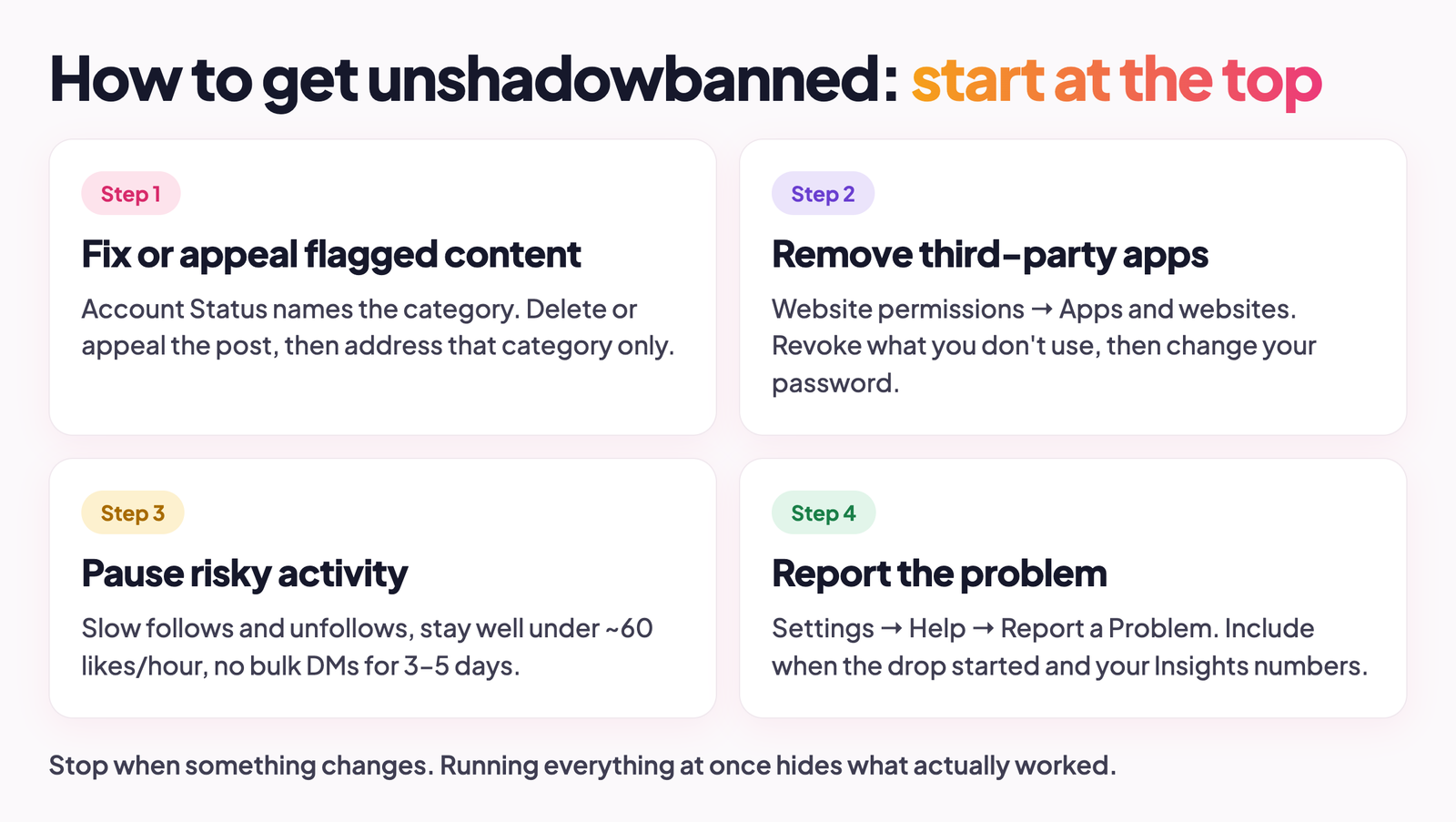
How to fix a shadowban on Instagram depends on what caused it. Running through everything at once doesn’t speed things up – it just makes it harder to tell what actually worked. Start at the top and stop when something changes. Once the restriction clears, the guide to organic Instagram growth covers how to build reach from a clean starting point.
Fix or Appeal Flagged Content in Account Status
Go back into Account Status. If a specific post is flagged, you’ve got two routes: delete it, or appeal if you think Instagram got it wrong. Appeals usually get reviewed within a few days. The part people miss is this – if the restriction is account-level rather than post-level, Account Status will tell you which category of guidelines triggered it. That category is what needs addressing. Not a general audit of your whole feed. Not deleting recent posts hoping one of them was the problem. The specific category, fixed directly.
Remove Third-Party Apps With Access to Your Account
Settings and activity, Website permissions, Apps and websites. Every app that currently has access to your account shows up there. Revoke anything you’re not actively using – growth tools from six months ago, scheduling apps you moved away from, anything that was ever set up to post or engage on your behalf. Then change your password. Apps you revoke can still run existing sessions until the password changes. This closes them. For automation-related restrictions, it’s often the quickest way to remove a shadowban on Instagram.
Pause Risky Activity for a Few Days
If there’s no flagged content and Account Status looks clean, the restriction is probably pattern-based. The fix is to remove the pattern. Slow down follow and unfollow activity significantly. Keep likes to a pace that a real person could sustain across a full day – user reports put Instagram’s unofficial threshold at around 60 likes per hour for newer accounts, more for established ones – a ceiling to stay well under, not a target. No bulk DMs for three to five days. This won’t guarantee the restriction lifts, but it removes the signals Instagram was reading as suspicious and gives a time-limited restriction room to expire on its own. Account-level restrictions usually take two to four weeks to clear, so keep the slower pace well beyond those first few days.
Report the Problem to Instagram
If Account Status shows nothing, but your non-follower reach has clearly dropped and stayed down, report it. Settings, Help, Report a Problem, ‘Something Isn’t Working’. Be specific: when the drop started, what your non-follower reach numbers look like in Insights across recent posts, what you’ve already checked and ruled out. Instagram’s response rate on reach issues is inconsistent at best. But filing a report creates a record, and occasionally it surfaces a restriction that Account Status didn’t flag.
How Long Does an Instagram Shadowban Last?
Instagram has published nothing official on timelines. Everything circulating online comes from aggregated user reports, which means the numbers are directional rather than exact. What tends to hold up across those reports:
- Post-level restrictions clear fast once the post is removed or an appeal is approved – usually within 24 hours, sometimes a bit longer depending on the review queue.
- Account-level recommendation restrictions typically run somewhere between two and four weeks, counting from when the triggering behaviour actually stops. Accounts with repeat violations tend to sit at the longer end, sometimes beyond it.
- Automation-related restrictions are the slowest to clear. The platform detected a sustained non-human pattern, and recalibrating takes longer than it does for a one-off content flag. A few weeks after removing the tools is a realistic expectation, not a worst case.
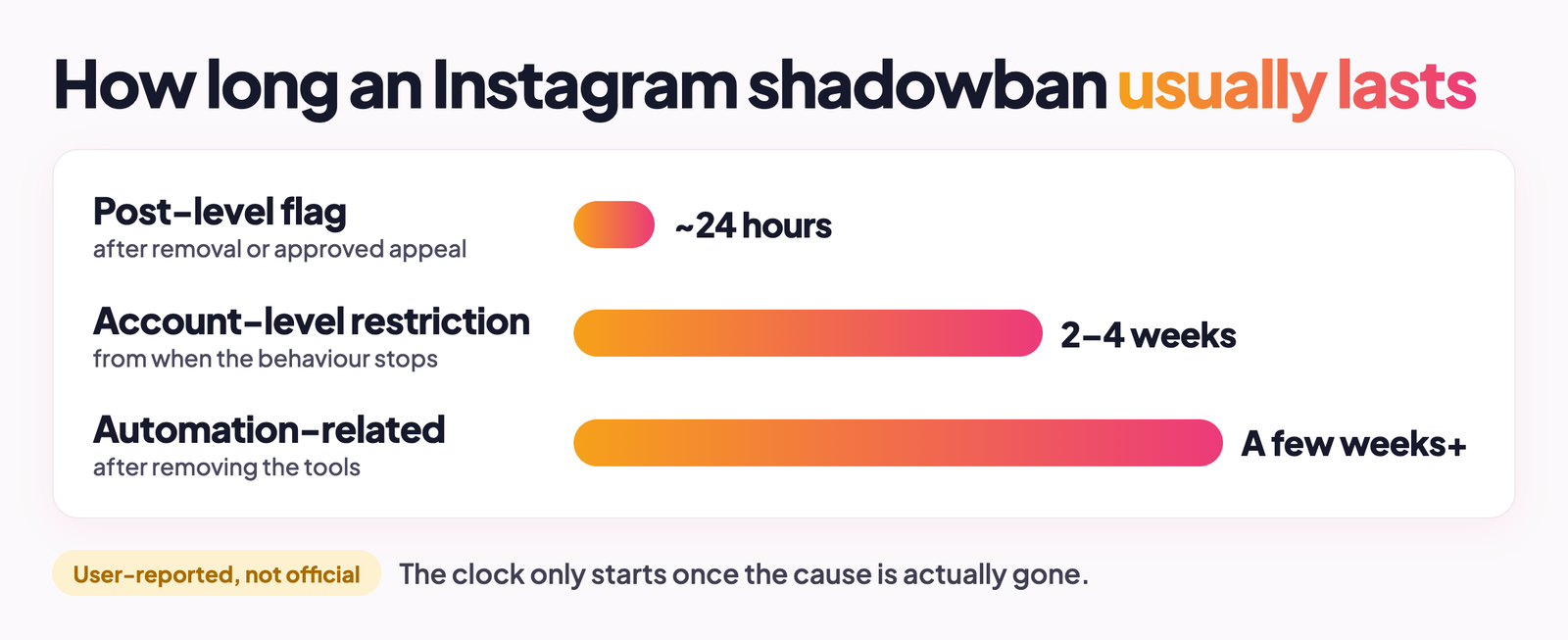
The timeline that matters isn’t how many days have passed. It’s whether the thing that caused the restriction is actually gone. An account that’s still running background app activity, still spiking follows, still hitting the same patterns – that restriction isn’t on a timer. It’s still being triggered. In the meantime, the guide to how to get more followers on Instagram covers how to build reach through approaches that don’t put the account at risk.
How to Grow on Instagram Without Getting Shadowbanned
Not being shadowbanned on Instagram mostly comes down to whether your activity looks like a person doing it. Content rules matter too, but Instagram’s systems aren’t only reading your content like a moderator would. They’re watching for patterns. A human using Instagram doesn’t follow 80 accounts in 40 minutes. They don’t like 200 posts in a single session and then go quiet. The detection is built around spotting those gaps between what real usage looks like and what yours looks like.
- Keep activity rates within what a person could plausibly do manually. The spike is the problem, not the daily total. Thirty follows spread across a day registers differently than thirty follows in twenty minutes – same number, different signal.
- Audit connected apps every few months. Tools you authorised months ago and stopped thinking about can still generate background activity on your account. Check Apps and websites under Website permissions and revoke anything you don’t actively use.
- Use hashtags that fit the content. Tags with tens of millions of posts bury your content immediately. High-traffic hashtags also attract more bot engagement, which doesn’t help your signals. Thirty seconds to check whether a tag has been restricted before using it is worth doing.
- Don’t buy followers or engagement. The gap between your follower count and your actual engagement rate is something Instagram’s systems track. A large following with low engagement is an anomaly, and anomalies get flagged. If you want outside help, the best Instagram growth service options are the ones that grow accounts through real engagement, not bought numbers.
- Grow through organic Instagram growth where possible. It takes longer. It also doesn’t periodically blow up your reach when the platform updates what it catches.
- Know the Instagram follow limit and stay well under it. Manual follow activity that stays inside those limits doesn’t look automated. Manual follow activity that keeps hitting the ceiling does.
None of this is complicated. The accounts that don’t run into restrictions aren’t doing anything clever – they’re just not giving Instagram’s systems anything to flag. If your reach has already dropped, an account audit will get you to the actual cause faster than working through the list above yourself.
Get a Free Instagram Audit to Find What Is Limiting Your Reach
Reach drops are frustrating to diagnose because several completely different problems produce the same symptom. A restriction is one explanation. Weak engagement signals pulling the algorithm back is another. Content that’s drifted from what your audience actually engages with, posting frequency that changed without you noticing, hashtags that stopped working – any of these can look identical in the numbers, and each one needs a different fix.
Get your free audit here – SocialStud.io’s free Instagram audit looks at what’s actually happening with your account rather than guessing. You get a specific answer, not a checklist of things to try.
Can Instagram Stories be shadowbanned?
Stories reach mostly your existing followers by default, so a restriction shows up differently than it does on feed posts. Where an Instagram story shadowban actually becomes visible is in the traffic that comes from shared Stories and location tags – sources that would normally bring in non-followers. If that traffic has dried up while everything else looks normal, Account Status is worth checking. The restriction mechanics are the same as for feed content; it’s just harder to notice because Stories weren’t reaching a wide non-follower audience to begin with.
Can a private Instagram account be shadowbanned?
Not in the way most people mean it. Private accounts don’t have public hashtag or Explore distribution – your content was never appearing there regardless. What private accounts can run into is an action block, where Instagram limits specific actions like follows or DMs because the activity pattern looked unusual, or a follow restriction if the account has been cycling follows and unfollows at a pace that reads as automated. That’s a different thing from a reach restriction.
Can a shadowban affect only some of your posts?
Yes, and it’s one of the more confusing scenarios. Content-level restrictions apply to individual posts rather than the whole account – one post might not appear in hashtag results while everything else distributes normally. Account Status lists flagged posts separately from account-level restrictions, so you can tell the difference. If you’re seeing inconsistent reach across posts with similar content and similar hashtags, that’s the thing to check first.
What is the difference between a shadowban and an action block?
An action block is visible. Instagram tells you directly: you can’t follow, like, or comment for a set period. You know it’s happening. A shadowban is the opposite – from your side of the account, everything looks completely normal. Your posts go up, your feed loads, nothing seems wrong. The reach data is what tells a different story. Action blocks tend to be short and tied to a single spike of activity. Reach restrictions run longer and usually follow a pattern of behaviour over time rather than one session.
What is the 5-3-1 rule on Instagram, and can it help you avoid a shadowban?
The 5-3-1 rule is an informal engagement framework that’s been circulating in the creator community for years: for every five posts you like from other accounts, leave three genuine comments and send one direct message. Instagram hasn’t endorsed it. The logic behind it is sound, though: varied activity spread across different action types at a sustainable pace looks more natural to the platform’s detection systems than a single action repeated in high volume. It won’t guarantee you avoid restrictions. It’s consistent with the behaviour that tends not to trigger them.